Portfolio Transfer
The Portfolio Transfer feature allows you to build your complete asset list quickly and easily — whether you are adding real portfolio positions or simply monitoring assets on your watchlist. Wavealert brings everything together in one clean overview.
Easily find and add assets
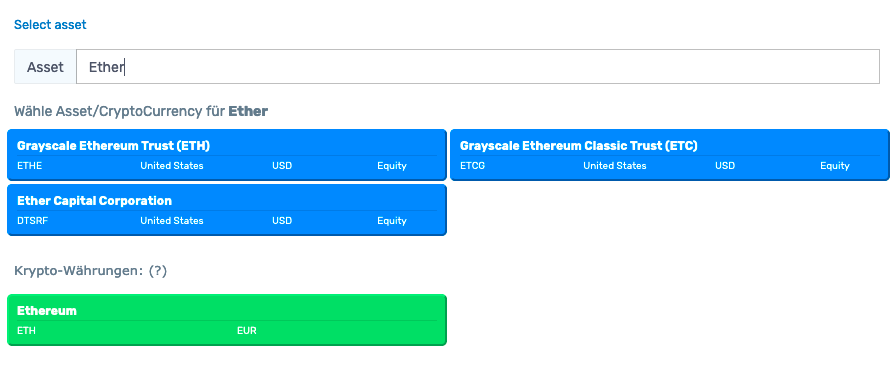
You can search for any asset by name, ISIN, or ticker.
As you type, Wavealert instantly displays relevant matches.
Highlights:
- fast, smart search suggestions
- support for all major asset classes
- cryptocurrencies appear as a green tile
- perfect for adding new assets or building a watchlist
Adding real portfolio positions
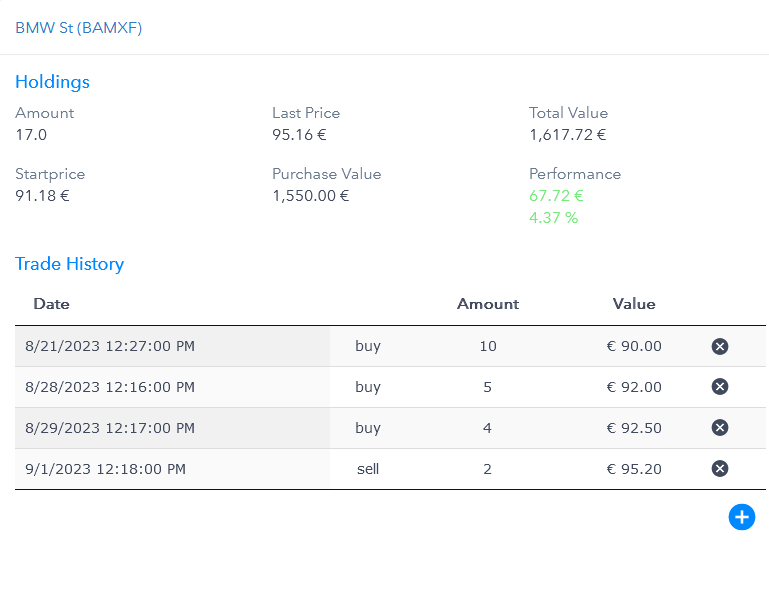
If an asset is part of your actual portfolio, you can enter:
- the purchase price
- the number of units
- decimal values for cryptocurrencies and fractional shares
Based on your data, Wavealert automatically marks the asset:
- green when you are in profit
- red when you are in loss
This gives you an instant overview of your performance.
Practical example
You import your existing portfolio and want to see gains and losses immediately.
With Portfolio Transfer, you enter assets within minutes — and Wavealert instantly highlights your winners and underperformers.
Perfect combinations with other Wavealert features
- Portfolio Tracker – view all assets in a unified list
- Stock Watchlist – monitor individual stocks effortlessly
- ETFs & ETCs – manage ETFs and commodity products
- Cryptocurrencies – track crypto holdings with alerts
- Gold & Silver – add physical metals to your portfolio
- Chart Alerts – react to meaningful price movements automatically
- Asset Notes – store personal strategies per asset
- News Analysis – understand market moves instantly
- 200-day-moving-average – recognize long-term trends
Register for free and create alerts and notes tailored to your strategy.
Learn more about our fair pricing under Pricing.